

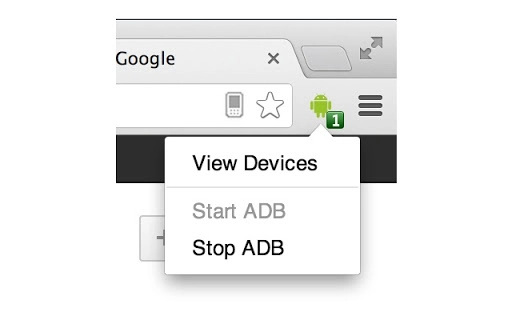
Description
ADB Plugin for Chrome Remote Debugging
Overview
The ADB Plugin is a Chrome extension designed to simplify remote debugging for Android devices directly from the Chrome browser. It runs the Android Debug Bridge (ADB) daemon in the background, eliminating the need to manually install the Android SDK or execute ADB commands through the command line. This tool is particularly useful for web developers and testers who need to inspect and debug web content on mobile devices without complex setup procedures.
By integrating ADB functionality into Chrome, the plugin enables seamless communication between desktop and mobile devices, allowing developers to access device inspection tools, view network activity, and debug JavaScript in real time. The extension supports Chrome on Android 24 and above, ensuring compatibility with modern mobile environments.
Although the developer notes that the extension is largely deprecated as of February 2014, it remains accessible for legacy workflows. The project is open source, hosted on GitHub, and maintained by the Google Chrome Team. It serves as a reference point for developers exploring remote debugging workflows, even if newer alternatives are recommended.
Key Features & Capabilities
- Integrated ADB Daemon – Runs the Android Debug Bridge service automatically within Chrome, removing the need for manual SDK installation or command-line execution.
- Remote Device Debugging – Enables real-time inspection of web content on Android devices through Chrome Developer Tools.
- Seamless Browser Integration – Functions entirely within the Chrome ecosystem, requiring no additional software or configuration.
- Open Source & Transparent – The source code is publicly available on GitHub, allowing developers to audit, modify, and contribute to the project.
- Minimal Setup – Once installed, the extension begins functioning immediately, reducing onboarding time for developers.
Developers can use this tool to troubleshoot responsive design issues, analyze network requests, and debug JavaScript errors on actual mobile devices without requiring physical access to a development machine. It’s especially helpful for teams working remotely or testing across multiple devices.
User Interface, Workflow & Performance
The ADB Plugin operates as a background service within Chrome, with minimal visible interface. Users interact with it indirectly through Chrome Developer Tools when connected to an Android device. The UI is streamlined and unobtrusive, focusing on functionality rather than visual complexity.
Navigating the debugging workflow involves enabling USB debugging on the Android device, connecting it to the computer, and accessing Developer Tools in Chrome. The extension automatically detects the device and establishes a debugging session. The process is efficient for developers familiar with Chrome’s debugging environment.
The developer did not specify resource usage details. Performance observations are based on general software behavior patterns. Given its lightweight nature (1.5 MB), the extension is expected to have low CPU and memory overhead. Stability is assumed to be consistent with Chrome’s extension ecosystem, though the deprecated status may affect long-term reliability.
Compatibility & System Requirements
The ADB Plugin is compatible with Windows, Mac, and Linux operating systems. It requires Chrome on Android 24 or higher for mobile device interaction, and the desktop version of Chrome must be updated to a recent release to ensure full functionality.
Installation size is 1.5 MB, indicating a lightweight footprint. The developer did not provide additional system requirements. Exact system requirements were not listed. Compatibility information was partially provided, with the focus on Chrome version and OS support.
Pros and Cons
Pros
- Eliminates the need for Android SDK installation
- Enables remote debugging without command-line tools
- Open source with transparent development
- Minimal setup and immediate usability
- Lightweight at 1.5 MB
Cons
- Deprecated as of February 2014
- Limited support for modern Chrome versions
- No official updates or maintenance
- May not work with newer Android devices or Chrome releases
- Reliance on outdated technology
FAQ Section
Is the ADB Plugin still functional?
The extension is largely deprecated and may not work reliably with current versions of Chrome or Android. It was last updated in 2014, and newer alternatives are recommended for consistent performance.
Do I need to install the Android SDK to use this plugin?
No, the ADB Plugin runs the ADB daemon internally within Chrome, removing the need for a standalone Android SDK installation.
What operating systems are supported?
The plugin supports Windows, Mac, and Linux systems, provided Chrome is installed and up to date.
Is the ADB Plugin secure to use?
As an open-source extension, the code is publicly available for review. However, due to its deprecated status, security updates are not issued. Use with caution on sensitive development environments.
Can I update the ADB Plugin manually?
Updates are managed through the Chrome Web Store. However, since the extension is no longer maintained, no new versions are released.
Final Thoughts
The ADB Plugin was once a pioneering tool for simplifying mobile remote debugging within Chrome. While it remains accessible as an open-source project, its deprecated status raises concerns about long-term functionality and compatibility. Developers seeking reliable, up-to-date remote debugging should consider current alternatives recommended by Google, such as the official remote debugging setup via Chrome DevTools.
Despite its limitations, the plugin serves as a valuable historical reference for understanding early mobile debugging workflows. For legacy use cases or educational purposes, it may still offer utility. However, for production development, it is not recommended.
Download ADB Plugin for Chrome Remote Debugging now
Guides & Tutorials for ADB Extension for Chrome
How to install ADB Extension for Chrome
- Click the Preview / Download button above.
- Once redirected, accept the terms and click Install.
- Wait for the ADB Extension for Chrome download to finish on your device.
How to use ADB Extension for Chrome
This software is primarily used for its core features described above. Open the app after installation to explore its capabilities.
User Reviews for ADB Extension for Chrome 0
No reviews found





